

BugReplay : Effortless Debugging with Instant Feedback Tools
BugReplay: in summary
BugReplay simplifies bug tracking with a user-friendly tool to capture, diagnose, and resolve issues quickly. Ideal for developers and QA teams, its standout features include synchronized screen recording, advanced annotation tools, and seamless integration with browsers.
What are the main features of BugReplay?
Real-time Session Replay
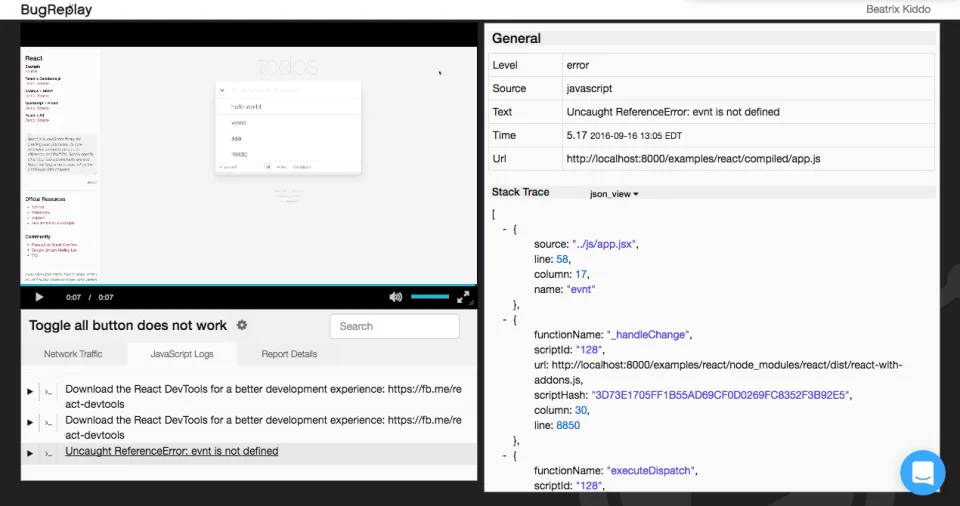
BugReplay provides a real-time session replay feature, allowing developers to capture a user’s interaction with precision. This utility enables a clear understanding of the bug context, enhancing debugging efficiency.
- Synced video and network requests capture.
- Console log recording for enhanced insights.
- Detailed playback options for thorough analysis.
Advanced Annotation Tools
Equipped with advanced annotation tools, BugReplay allows users to add notes directly on the recorded sessions. This feature facilitates clear communication within teams, making the debugging process more efficient and collaborative.
- Highlight key areas with drawing tools.
- Add text notes for detailed explanations.
- Attach additional files for comprehensive reports.
Seamless Browser Integration
Offering seamless integration with browsers, BugReplay ensures a smooth workflow for debugging tasks. It’s designed to integrate effortlessly into existing development environments, reducing disruption and improving productivity.
- Easy-to-install browser extensions for quick access.
- Compatible with multiple popular browsers.
- Automatic updates for continuous improvements.
Screenshots
BugReplay: its rates
standard
Rate
On demand
Customer reviews about BugReplay
Appvizer calculates this overall rating to make your search for the best software easier. We've based it on user-generated verified reviews on industry-leading websites.