

Tom's Planner : Intuitive Online Project Management Solution
Tom's Planner: in summary
Tom’s Planner simplifies project planning for individuals and small teams. It’s designed for those searching for an easy-to-use tool with robust collaborative features. The software stands out with its intuitive drag-and-drop interface, real-time editing, and seamless integration capabilities.
What are the main features of Tom’s Planner?
Drag-and-Drop Interface
Tom’s Planner offers a simple and effective way to create project schedules with its drag-and-drop feature, promoting ease of use and saving time.
- Interactive Scheduling: Modify and adjust your timelines effortlessly.
- Visual Clarity: Quickly understand project progress with intuitive visual cues.
- Customisation Options: Tailor your timelines with personalised colours and styles.
Real-Time Collaboration
Enhance team productivity with Tom’s Planner’s real-time collaboration features, ensuring every team member stays aligned and informed.
- Simultaneous Editing: Multiple users can access and modify plans without conflict.
- Instant Feedback: Team members can comment on tasks and updates instantaneously.
- Role-Based Permissions: Manage who can view or edit certain parts of the project.
Seamless Integration
Tom’s Planner integrates smoothly with existing tools you use, enhancing your workflow without the need for drastic changes.
- Calendar Synchronisation: Connect with Google Calendar or iCal for seamless schedule maintenance.
- Import/Export Options: Support for CSV/Excel files facilitates data transfer.
- Compatibility: Easily integrate with popular apps like Trello and Slack.
Screenshots
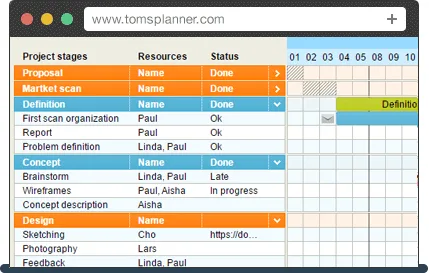
Tom's Planner: its rates
Standard
Rate
On demand
Customer reviews about Tom's Planner
Appvizer calculates this overall rating to make your search for the best software easier. We've based it on user-generated verified reviews on industry-leading websites.